
Making WireGUI
At work, we use WireGuard to connect to different environments. To connect, we had to open a terminal and type the commands manually, and since we were switching between environments quite often, it started to get a little annoying.
It was also hard to tell at a glance if I was connected or which environment I was connected to. I wanted something simple that could show me the current connection and let me switch tunnels without having to type the same commands every time.
So I decided to make WireGUI, a graphical interface for WireGuard.
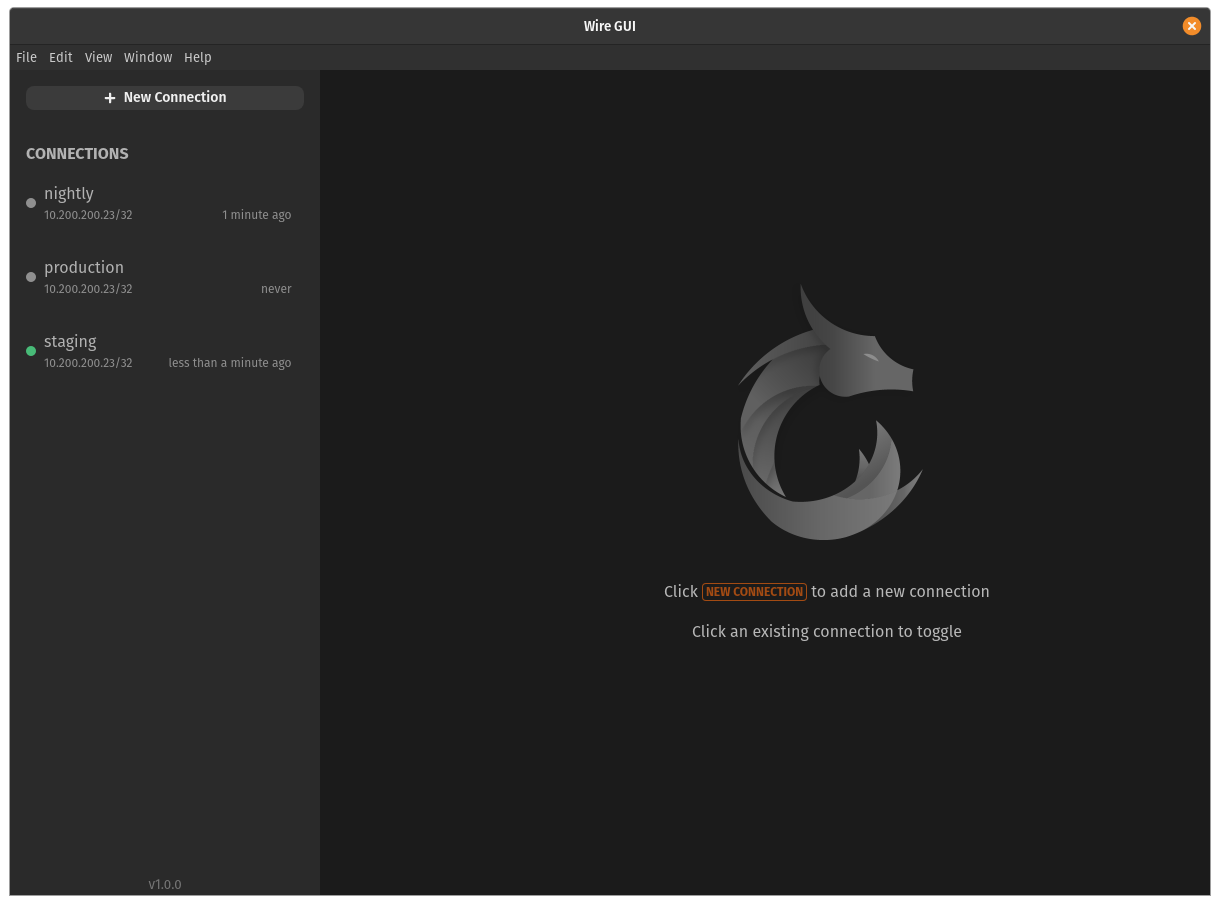
A simpler way to switch
The main idea was to have a list of my saved tunnels in one place. From there, I could connect or disconnect and see which tunnel was currently connected.
WireGUI also shows when each tunnel was last connected, which is nice when there are several configurations in the list and I’m trying to find the one I need.
It’s a pretty simple application, but that was what I wanted. I didn’t need to remember the commands every time I switched environments, and I could just look at the window to see the connection.
Other people started using it
I initially made WireGUI because the terminal workflow was bothering me. After a while, though, many other people in the company started using it too.
It’s cool when something I made to solve a problem for myself ends up being useful to other people. In this case, we were all switching between environments, so having a small interface for it made sense.
WireGUI is built with Electron, React and TypeScript, and the source is available on GitHub if you want to take a look:
This was a fun little project, and now switching between WireGuard tunnels is a lot less annoying.
Filed under development.