
WhatsApp in the terminal
Lately I’ve been trying to move more of my setup into the terminal. I find TUI applications very cool, and after I started using Concord for Discord and Spotatui for music, I wanted to see how much of my day-to-day setup could live there.
One thing I was still missing was WhatsApp. So I decided to make whatsatui, a personal WhatsApp terminal client written in Rust with Ratatui.
Here’s how it looks:
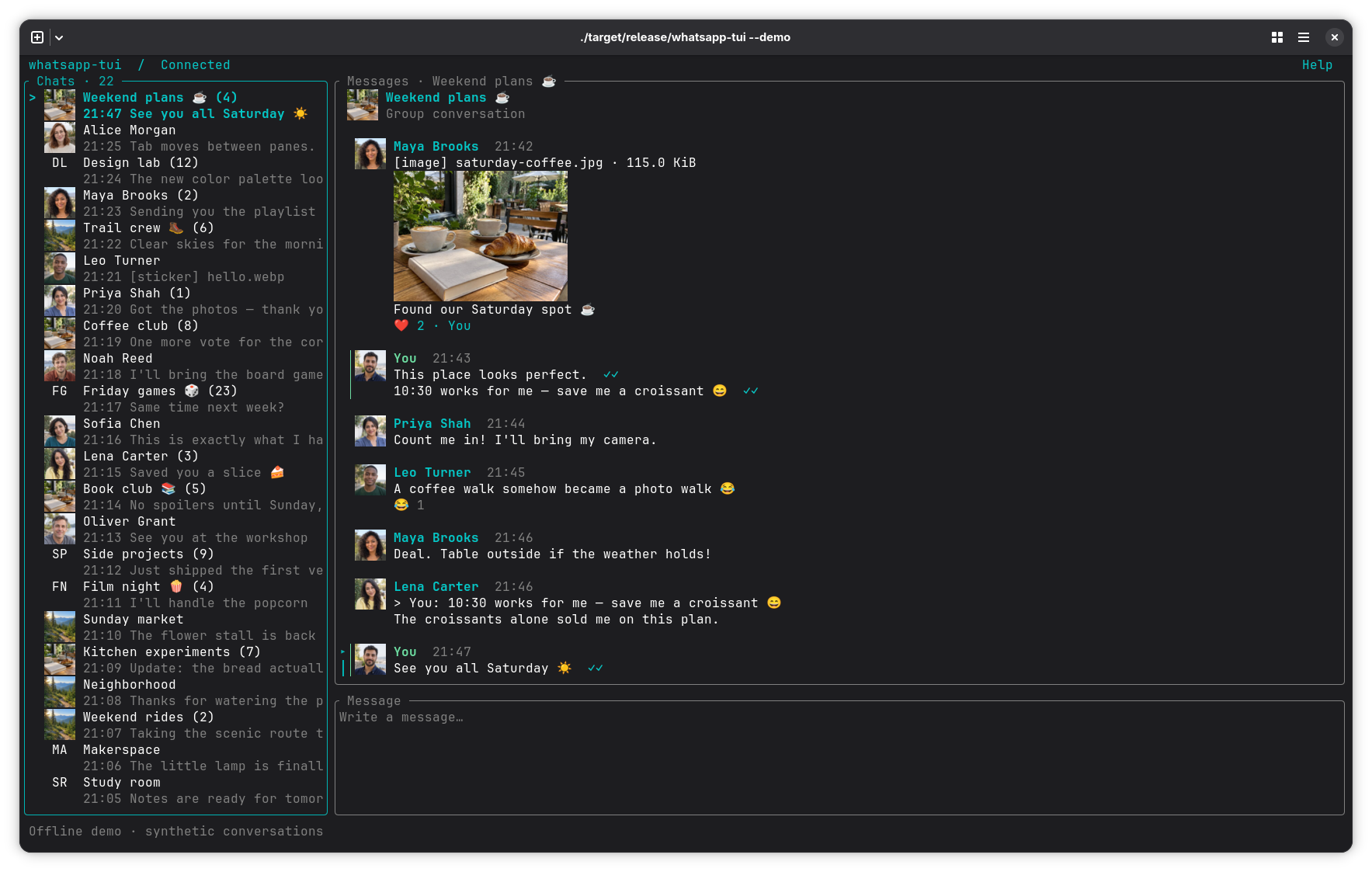
The idea is pretty simple: have my chats, messages and composer in the terminal, and be able to move between them without reaching for the mouse every time.
Chats, messages, and a keyboard
Imagine I’m working in the terminal and a message comes in. I want to check the conversation, send a quick reply, and get back to what I was doing.
In whatsatui, I can move between the chat list, messages and composer with Tab. If I have too many chats to scroll through, I can use the fuzzy switcher to find the one I want by name. There’s also an unread filter for when I just want to see what I missed.
That’s a small example of what I enjoy about TUIs. The application is still there with the information I need, but I can move around it with the keyboard and keep it next to everything else I have open.
The composer supports multiline text and quoted replies too. One detail I like is that drafts are kept per chat, so if I start writing something and switch conversations, the text is still there when I come back.
More than just text
A WhatsApp client needs to handle more than messages. People send images, stickers, voice messages and videos all the time, so those are part of whatsatui too.
Images and stickers can be shown inline in terminals that support graphics, with a fallback for terminals that don’t. Animated stickers and GIFs can also be displayed; GIF playback requires FFmpeg.
For audio and voice messages, whatsatui uses mpv and provides playback controls inside the TUI. Videos can be opened in an mpv window, and received attachments can be downloaded and opened separately.
I think it’s fun seeing things like images and animated stickers show up alongside text in a terminal. It’s still a terminal interface, but it can handle more of a regular conversation than I used to expect from one.
A few details
The interface is built around three panes: chats, messages and the composer. Ratatui handles the terminal interface, while the application keeps local history and drafts in SQLite.
There’s a search for cached message text and media captions inside a conversation. That makes it possible to find something in the local history and jump to the matching message, instead of scrolling back through everything.
Another detail is how outgoing messages are handled. Sending a message can sometimes leave the result uncertain, so whatsatui keeps track of outgoing attempts and asks for confirmation before resending an uncertain one. It’s a small thing, but sending the same message twice because I wasn’t sure what happened would be annoying.
The colors and key bindings can be configured too, and there’s a layout for narrower terminals. I like being able to make tools fit into the rest of my setup, especially when I’m going to have them open next to other terminal applications.
Trying it out
Whatsatui is a personal project, and it’s available on GitHub if you want to take a look at the code or try it yourself:
I started looking at TUIs because I thought they were cool, and making one for an application I use regularly felt like a fun way to keep going with that idea. Now I have another piece of my setup in the terminal, and I’m curious to see what else I’ll end up moving there.
Filed under development.